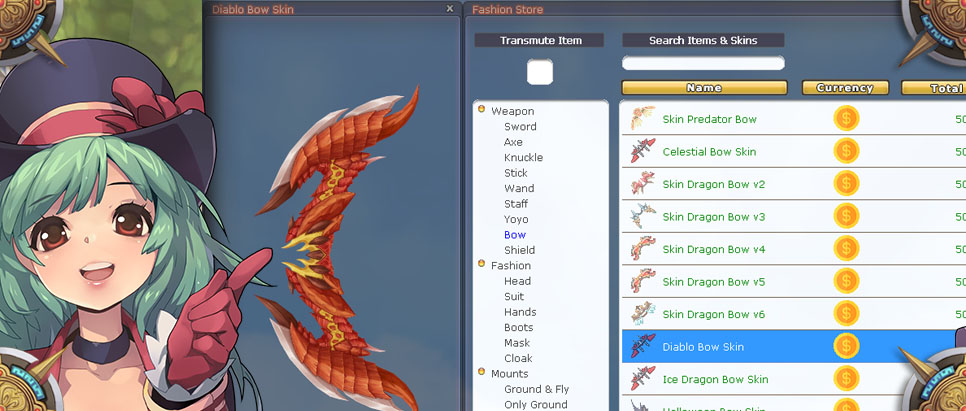
Donate Store
The Donate Store offers premium cosmetic items, starter packages, and character customization options. All purchases support the server and provide permanent account-bound rewards.
How to Access the Donate Store
- Purchase Donate Coins on the website
- Send coins to your character in-game
- Open the Donate Store from your inventory
Recommended Starter Packages
New players should consider one of the three starter packages with powerful set effects:
Lightspeed Package
| Package | Contents |
|---|---|
| Lightspeed Package (M) | Lightspeed Set (M), Premium (28 days), Lucky LoL CS Pet Box |
| Lightspeed Package (F) | Lightspeed Set (F), Premium (28 days), Lucky LoL CS Pet Box |
Set Effect: Speed-focused bonuses for faster gameplay
Destructive Package
| Package | Contents |
|---|---|
| Destructive Package (M) | Destructive Set (M), Premium (28 days), Lucky LoL CS Pet Box |
| Destructive Package (F) | Destructive Set (F), Premium (28 days), Lucky LoL CS Pet Box |
Set Effect: Damage-focused bonuses for higher DPS
Almighty Package
| Package | Contents |
|---|---|
| Almighty Package (M) | Almighty Set (M), Premium (28 days), Lucky LoL CS Pet Box |
| Almighty Package (F) | Almighty Set (F), Premium (28 days), Lucky LoL CS Pet Box |
Set Effect: Balanced bonuses for all-around performance
Package Value
Each package includes:
- Full Fashion Set (4 pieces: Hat, Suit, Gloves, Boots)
- 28 Days Premium - All premium benefits
- Lucky LoL CS Pet Box - Chance at rare CS pets
Wardrobe & Skin System
The Wardrobe system allows you to apply cosmetic skins to any equipment, keeping the look you want while wearing any gear.
How the Wardrobe Works
- Fashion sets purchased from the Donate Store go into your Wardrobe
- Wardrobe is the first menu in the Donate Store
- Skins can be applied to unlimited items - use the same skin forever!
How to Apply a Skin (Transmute)
- Put the item you want to skin in the slot in the top-left corner
- Double-click the skin in your Wardrobe
- The item will be model-changed to look like the skin
- Note: The item becomes Event status (non-tradable) after skinning
How to Remove a Skin
- Put the skinned item in the top-left slot
- Double-click the same skin in your Wardrobe again
- The skin is removed and the item returns to normal
- The item becomes tradable again after removing the skin
Important Notes
- Account Bound: Skins are bound to your account, not character
- Cross-Season: Use your skins in all future seasons
- Cross-Server: Works on all servers (including base server)
- Unlimited Use: Apply the same skin to as many items as you want
- Event Status: Skinned items cannot be traded until skin is removed
Aura Shop (Glow Effects)
The Aura Shop offers permanent glow effects for your character. These visual effects make your character stand out with unique particle effects.
How Auras Work
| Feature | Details |
|---|---|
| Duration | Permanent |
| Binding | Character-bound (cannot transfer) |
| Visual | Glowing particle effects around character |
| Stacking | One aura active at a time |
Available Auras
Various glow colors and styles available:
- Fire/Flame effects
- Ice/Frost effects
- Lightning effects
- Holy/Divine effects
- Dark/Shadow effects
- Custom seasonal auras
Important Aura Notes
- Character Bound: Auras stay on the character they're purchased for
- Cannot Transfer: Unlike wardrobe skins, auras cannot move to other characters
- Permanent: Once purchased, you have the aura forever
- Cosmetic Only: No stat bonuses, purely visual
Purchasing Guide
Step 1: Buy Donate Coins
- Visit the Dragon Crusade website
- Go to the Donate section
- Choose your payment method
- Purchase Donate Coins
Step 2: Send Coins In-Game
- Log into your character
- Access the coin transfer feature
- Send coins to your active character
Step 3: Open Store & Purchase
- Open the Donate Store in-game
- Browse Wardrobe (first tab) for skins
- Browse Auras for glow effects
- Purchase desired items
Tips for New Players
Best First Purchases
| Priority | Item | Why |
|---|---|---|
| 1st | Starter Package | Premium + Set + Pet |
| 2nd | Additional Skins | Customize your look |
| 3rd | Aura | Stand out visually |
Smart Shopping
- Start with a package - Best value for new players
- Use Premium benefits - 28 days to maximize gains
- Skins are forever - Invest in looks you love
- Plan aura purchases - They're character-locked
Transmute Quick Reference
| Action | Result |
|---|---|
| Apply skin (first time) | Item gets new look, becomes Event (non-tradable) |
| Remove skin (double-click same skin) | Item returns to original look, becomes tradable |
| Use skin again | Can apply to unlimited items |
Related Content
- Premium - Premium membership benefits
- CS-Sets - Cash Shop set effects
- Season Pass - Earn rewards through gameplay